
Krita Plugin for Background Removal
Krita 5.2+ / 6 · Local API · Transparency mask · Smart Brush
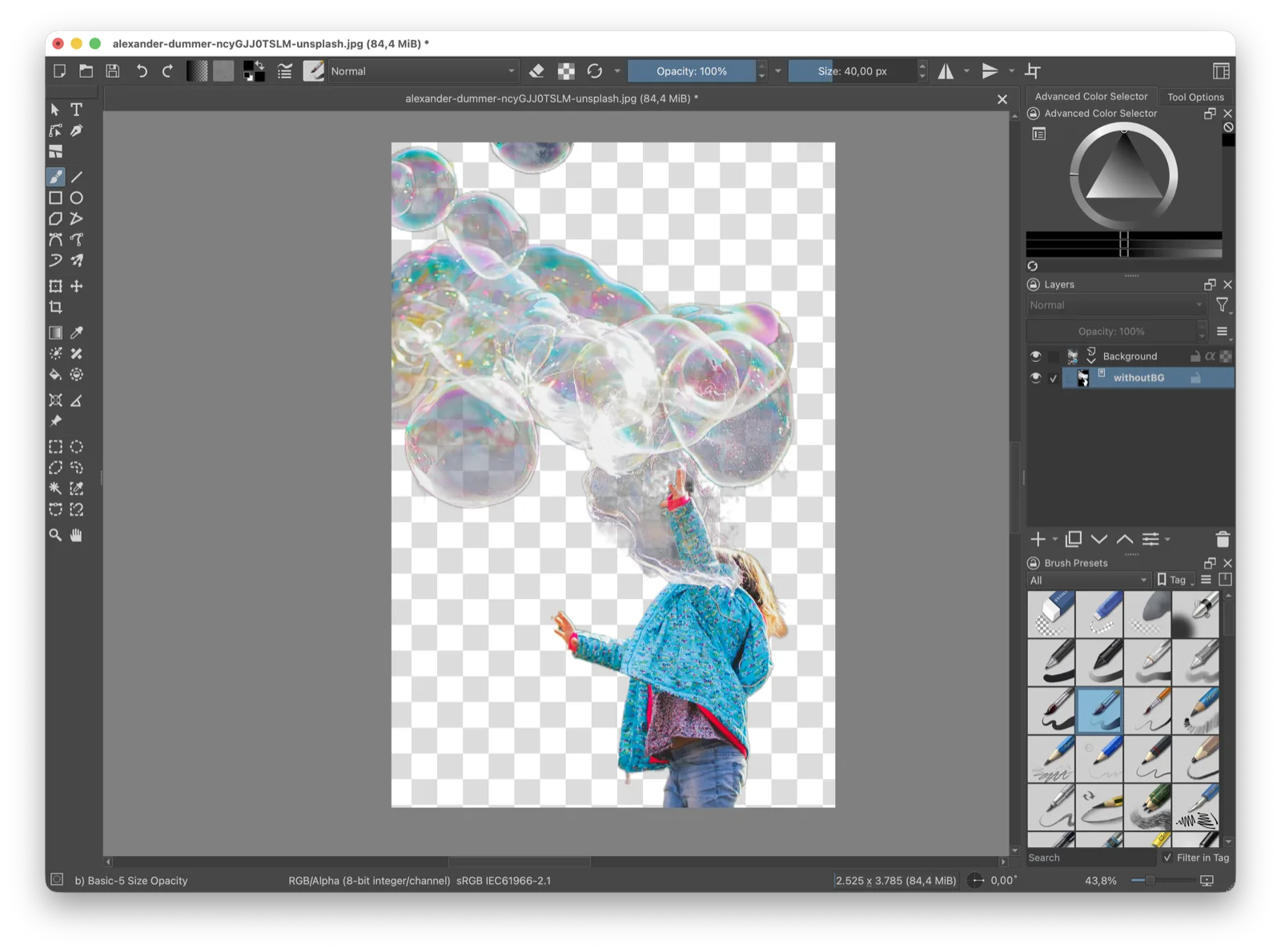
Requirements#
| Dependency | Notes |
|---|---|
| Krita 5.2+ or 6 | PyQt5 (Krita 5) or PyQt6 (Krita 6); Python plugins must be enabled |
| Local withoutBG server | Running at http://127.0.0.1:8000 before you invoke the plugin (see below) |
Start a local server#
The plugin talks to a withoutBG HTTP API on 127.0.0.1. Pick one backend and run one at a time on port 8000.
Docker service (any platform)#
Uses the open weights v4 ONNX model from withoutbg-inference. Use the GPU image if you have CUDA.
Server URL for the plugin: http://127.0.0.1:8000
docker run --rm -p 8000:8000 withoutbg/withoutbg-openweights-v4-service-cpu:latestFull Docker docs: /docs/open-model/docker
Mac app Local API#
macOS only. withoutBG for Mac is a desktop batch app with an optional Local API in the menu bar. Start the Local API and confirm the menu bar shows Local API Running. Default URL: http://127.0.0.1:8000. On Apple Silicon, inference uses Core ML. More: Local API docs.
Verify the server#
Health check
curl http://127.0.0.1:8000/healthWait until /ready returns {"status":"ready"} on first startup (model warmup).
Install the plugin#
Clone and install
git clone https://github.com/withoutbg/withoutbg-krita.git
cd withoutbg-krita
./install.sh
The script links the plugin into Krita's pykrita folder (macOS, Linux, Flatpak). Then restart Krita, tick withoutBG in Settings ▸ Configure Krita ▸ Python Plugin Manager, and restart once more.
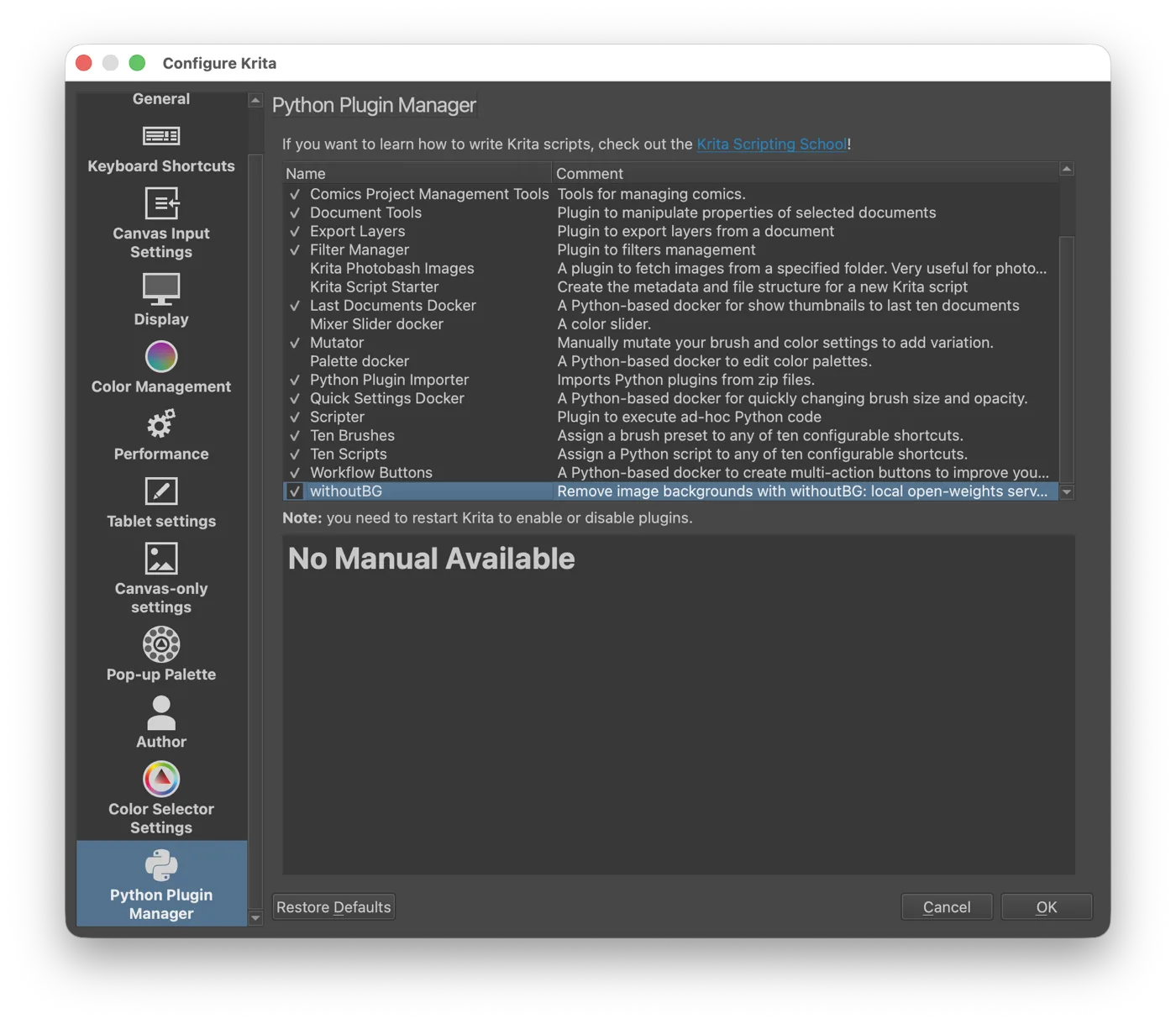
Prefer a zip? Run scripts/package.sh and use Import Python plugin from file… in the same Python Plugin Manager.
The actions appear under:
Menu paths
Tools ▸ Scripts ▸ withoutBG: Remove Background…
Tools ▸ Scripts ▸ withoutBG: Smart Brush…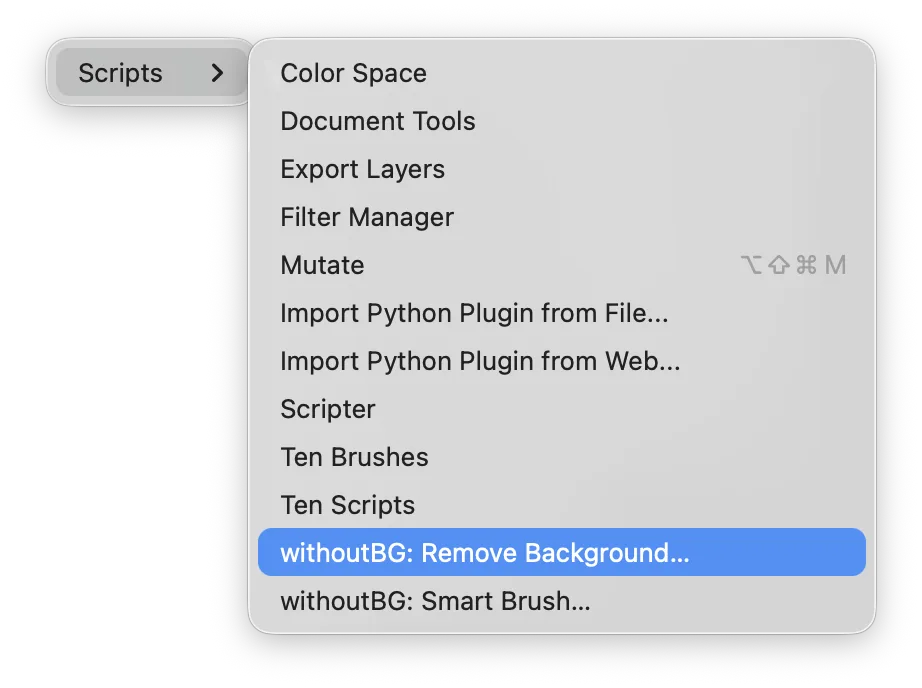
Plugin folders#
| Platform | pykrita directory |
|---|---|
| macOS | ~/Library/Application Support/krita/pykrita/ |
| Linux | ~/.local/share/krita/pykrita/ |
| Linux (Flatpak) | ~/.var/app/org.kde.krita/data/krita/pykrita/ |
Remove a background#
- Select the layer to cut out (a paint layer, not a group).
- Go to Tools ▸ Scripts ▸ withoutBG: Remove Background…, then click Remove Background.
- The cutout is added as a transparency mask named withoutBG. Review it. Right-click the mask in the Layers docker ▸ Merge to commit, or delete it to discard.
Running it again on the same layer keeps the earlier mask, hidden, as withoutBG (previous). Krita scripts cannot add to the undo stack, so this is the way back.
Fix the mask with Smart Brush#
Open Tools ▸ Scripts ▸ withoutBG: Smart Brush… with the layer selected. The dialog shows the cutout on a checkerboard. Draw on it; strokes are smoothed, so a rough line is enough. Smart Brush starts from the mask as it is, so hand edits are kept. See Smart Brush for the idea behind it.
| Control | What it does |
|---|---|
| Keep / Remove | Keep (green) over what went missing, Remove (red) over what should go. X switches, right-drag paints the other colour. |
| Brush size | Slider or field, [ / ], Ctrl + scroll |
| Background | How much of the removed background shows through while you edit |
| Undo stroke / Clear | Ctrl+Z removes the last stroke; Clear removes them all |
| Apply / Done | Apply updates the mask in place; paint more and Apply again, or Done |
| Revert | Puts the mask back as it was when the dialog opened |
Smart Brush runs on the local open-weights server (v4). After the first Apply, later ones are faster: the plugin keeps a small edit context for the layer, saved in the .kra. On a cutout made with withoutBG Pro, it runs on Pro instead: each Apply sends the photo and every stroke so far (stateless, 1 credit per Apply).
Optional: withoutBG Pro#
No server, or want the hosted model? Tick Use withoutBG Pro (cloud) and paste a withoutBG Pro API key, or set WITHOUTBG_API_KEY in the environment Krita starts from.
With Pro on, the layer (downscaled to 1024 px) is sent to api.withoutbg.com and uses 1 credit. The matte still comes back as a mask. A typed key is saved in Krita's settings; use the environment variable to keep it out.
Troubleshooting#
| Symptom | Fix |
|---|---|
| Server not reachable | Start the Docker service or the Mac app Local API. Confirm curl http://127.0.0.1:8000/health (or your port). |
| Actions missing under Tools ▸ Scripts | Restart Krita, tick withoutBG in Settings ▸ Configure Krita ▸ Python Plugin Manager, then restart once more. |
| Nothing happens on a group layer | Select a paint layer, not a group. |
| Wrong port | Update Server URL in the dialog to match your backend (default 8000). Only one backend should listen on that port at a time. |
| Edges look soft | The layer is capped at 1024 px before inference and the matte is upscaled; use Smart Brush or paint on the mask to refine. |
Uninstall#
Uninstall commands
rm -rf ~/Library/Application\ Support/krita/pykrita/withoutbg{,.desktop}   # macOS
rm -rf ~/.local/share/krita/pykrita/withoutbg{,.desktop}                   # Linux
Restart Krita.
Model and license#
The plugin code is GPL-3.0-or-later, like Krita. The model is the withoutBG Open Weights Model (v4), under the withoutBG Open Model License: a trained router sends fine strands, soft detail and transparency to the withoutBG matting branch, and hard opaque objects, flat scenes and vehicles to BiRefNet. Built with DINOv3.
Common questions#
- Does the Krita plugin upload my images to the cloud?
- Not by default. The plugin talks to a withoutBG HTTP API on 127.0.0.1 (Docker service or Mac app Local API) and processing stays on your machine. Only if you tick Use withoutBG Pro (cloud) and add an API key is the layer (downscaled to 1024 px) sent to api.withoutbg.com.
- Which Krita versions are supported?
- Krita 5.2 or newer (PyQt5) and Krita 6 (PyQt6). Older Krita 4 and 5.0 / 5.1 releases are not supported.
- What does the plugin add to my layer?
- A non-destructive transparency mask named withoutBG, built from the alpha matte. Review it, then right-click the mask in the Layers docker and choose Merge to commit, or delete it to discard.
- What is Smart Brush in Krita?
- A dialog that shows the cutout on a checkerboard. Draw Keep (green) over what went missing and Remove (red) over what should go, then Apply. The mask updates in place, and hand edits you made to the mask are kept.
- Do I need Docker, or can I use the Mac app?
- Either works. Run the Docker withoutbg service on port 8000, or start the Local API from withoutBG for Mac. Default Server URL is http://127.0.0.1:8000 for both. Run one backend at a time on that port.
- Can I undo a run?
- Krita scripts cannot add to the undo stack. Instead, running the plugin again on the same layer keeps the earlier mask, hidden, as withoutBG (previous). Smart Brush has Undo stroke and a Revert button.
- Is the Krita plugin free?
- Yes. The plugin is GPL-3.0-or-later, like Krita, and runs the free withoutBG open weights locally. Pro is an optional per-image cloud mode that uses 1 credit per image.
Related#
| Resource | Link |
|---|---|
| GIMP plugin | /open-model/plugins/gimp |
| ComfyUI node | /open-model/plugins/comfyui |
| Docker self-hosting | /docs/open-model/docker |
| withoutBG for Mac | /mac |
| Local API docs | /docs/open-model/local-api |
| Smart Brush | /smart-brush |
| Open Model | /open-model |
| Plugin source | github.com/withoutbg/withoutbg-krita |