
Coming next: one gateway, two specialist models#
The next community release automatically routes each image to the model suited to its edges. withoutBG trains and maintains the matting branch for hair, fur, soft detail, and transparency. BiRefNet handles segmentation for opaque objects, flat scenes, and vehicles.
Matting → withoutBG
Fine strands, soft boundaries, and partially transparent regions.
Segmentation → BiRefNet
Solid subjects and clearly defined object boundaries.
This pipeline is being prepared for Python, the Mac app, Docker, and Hugging Face. GIMP uses the gateway in its connected Mac or Docker server. Routing runs wherever inference runs; local installations keep images on your device. Existing downloads and benchmark results still refer to the released model until the new bundles ship.
Self-Hosted Background Removal with Docker
CPU · GPU · API only · Web UI · ONNX Runtime
Pick the right image#
Start here if you are not sure which one to pull.
| You want to… | Pull this image | Port |
|---|---|---|
| Try background removal in a browser on any machine | app-cpu | 8080 |
| Give non-technical users a drag-and-drop UI | app-cpu or app-gpu | 8080 |
| Call the API from your own app, script, or workflow | service-cpu or service-gpu | 8000 |
| Use the GIMP 3 plugin for in-editor background removal | service-cpu or service-gpu | 8000 |
| Deploy behind a load balancer or in Kubernetes | service-cpu or service-gpu | 8000 |
| Process images as fast as possible on an NVIDIA GPU | service-gpu or app-gpu | 8000 / 8080 |
| Run on a VPS, laptop, or CI runner with no GPU | service-cpu or app-cpu | 8000 / 8080 |
Default recommendation: pull withoutbg/withoutbg-openweights-v3-app-cpu:latest if you want to see it working in under a minute. Switch to service-* when you are integrating programmatically and do not need the UI.
When Docker is not the best fit:
- Python library — pip install withoutbg if you want to embed inference in an existing Python process without container overhead.
- Mac app — native macOS app for a desktop GUI with no terminal.
- GIMP plugin — GIMP 3 plugin (source on GitHub) talks to a local API on port 8000 (Docker
service-*or Mac server app). Install the plugin, start a backend, then use Tools ▸ WithoutBG ▸ Remove Background…. - No install — Hugging Face Space or the hosted demo at withoutbg.com.
Quick start#
Web app (most people start here)#
Open http://localhost:8080 after the model warms up.
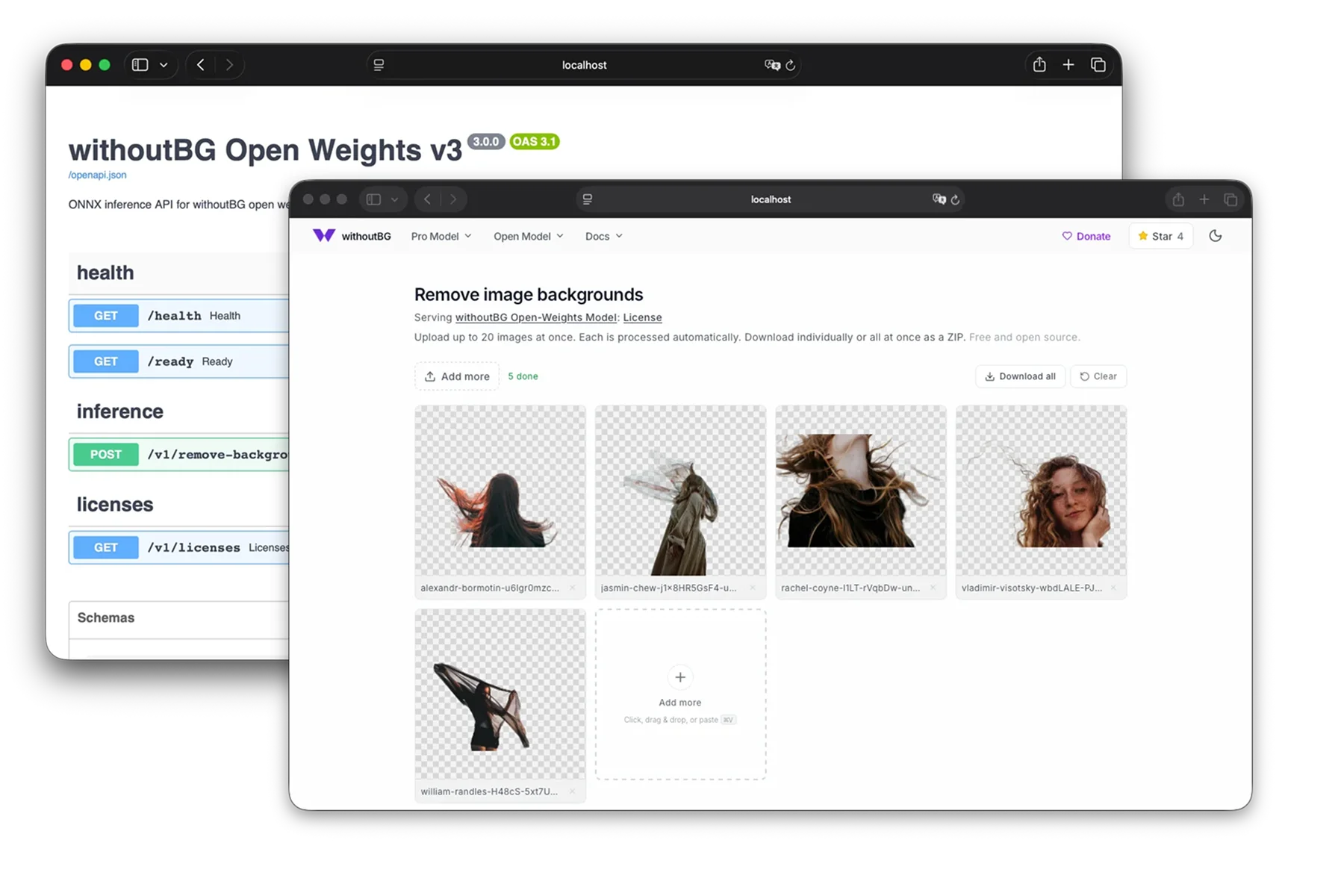
docker run --rm -p 8080:8080 withoutbg/withoutbg-openweights-v3-app-cpu:latestOpen http://localhost:8080 for a drag-and-drop background removal UI. The same container also exposes the inference API under /api.
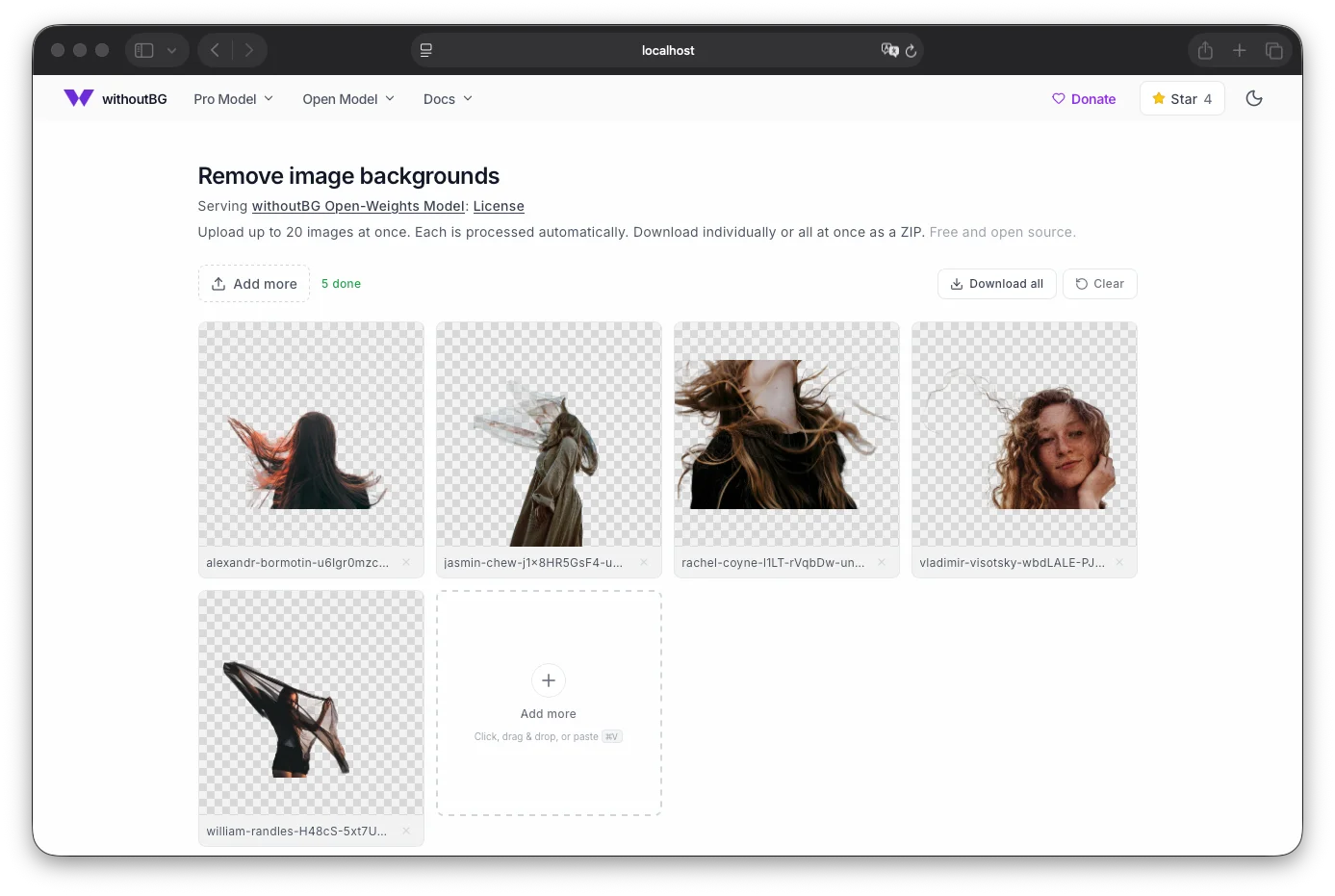
First startup loads and warms the model (usually 10–30 seconds on CPU). Wait until /ready returns {"status":"ready"} before uploading large batches.
API only (headless)#
Prefer no UI? The service-* images are headless FastAPI servers: integrations, GIMP, scripts, Kubernetes, and batch jobs. Interactive OpenAPI / Swagger UI is available at http://localhost:8000/docs after the container starts.
Headless FastAPI server on port 8000.
docker run --rm -p 8000:8000 withoutbg/withoutbg-openweights-v3-service-cpu:latest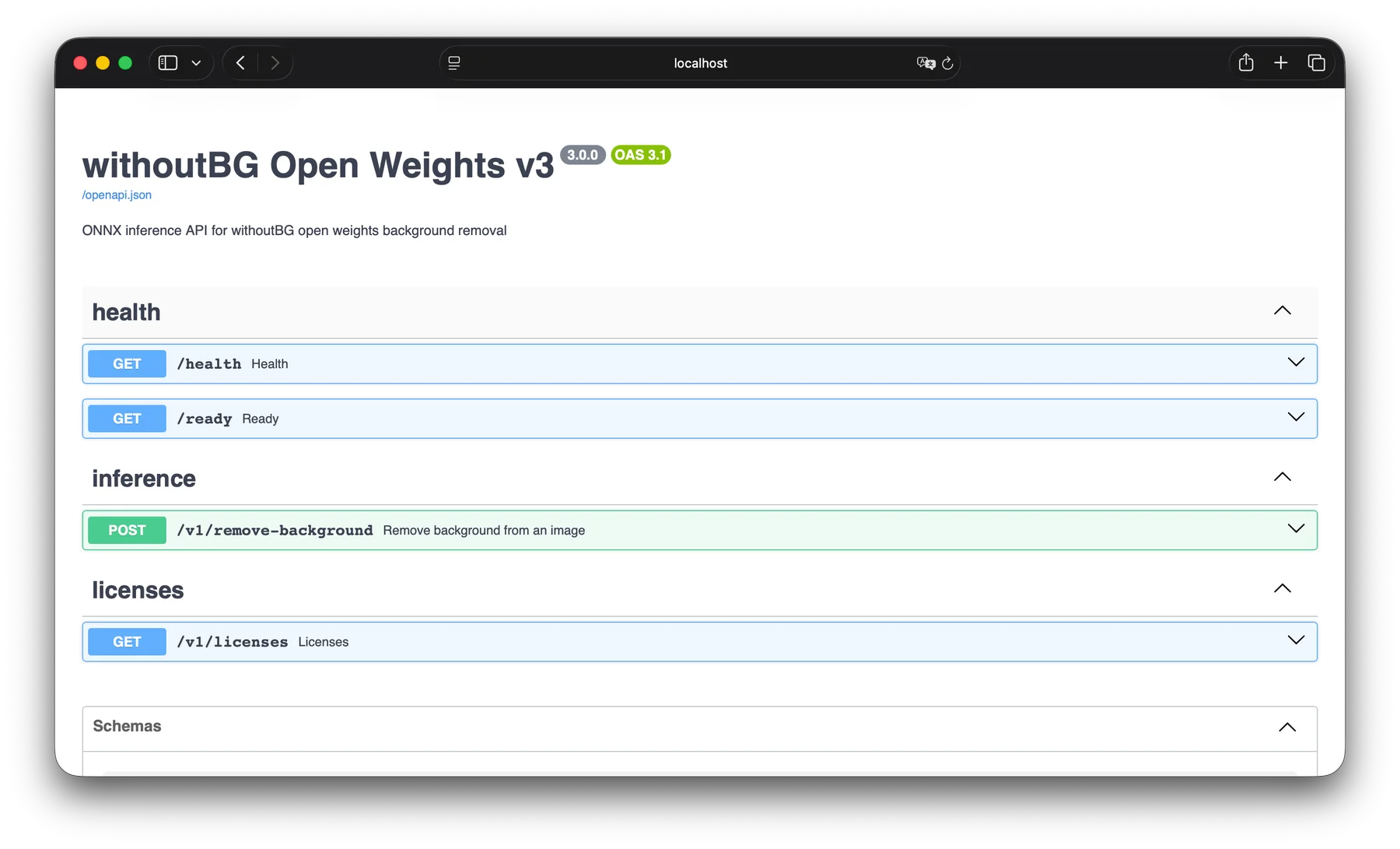
On app images, prefix paths with /api (e.g. /api/v1/remove-background on port 8080).
Health checks
# Liveness (also used by the GIMP plugin to show server status)
curl http://localhost:8000/health

# Readiness (503 until model is warmed up)
curl http://localhost:8000/ready
/health response:
Health response
{
  "status": "ok",
  "model": "withoutbg-openweights-oss",
  "version": "4.1.0"
}
JSON API (web UI, scripts)#
Send a base64-encoded image; get data URLs back.
JSON API example
# Works on macOS and Linux
IMAGE_B64=$(base64 < photo.jpg | tr -d '\n')
curl -X POST http://localhost:8000/v1/remove-background \
  -H "Content-Type: application/json" \
  -d "{\"image\":\"${IMAGE_B64}\"}"
Request body:
Request schema
{
  "image": "<raw base64 string, or data:image/jpeg;base64,...>"
}
Response fields:
| Field | Description |
|---|---|
processed | Transparent PNG cutout as a data URL |
alphaMatte | Grayscale alpha matte as a data URL |
latencyMs | Server-side inference time in milliseconds |
Example response:
Response schema
{
  "processed": "data:image/png;base64,...",
  "alphaMatte": "data:image/png;base64,...",
  "latencyMs": 842
}
JSON error responses use {"detail": "..."}.
Raw image API (GIMP plugin and local clients)#
POST the image bytes directly, with no base64 wrapping. The server detects the request format from Content-Type.
Raw image API examples
# Transparent cutout (default)
curl -X POST http://localhost:8000/v1/remove-background \
  -H "Content-Type: image/png" \
  --data-binary @photo.png \
  -o cutout.png \
  -D -

# Alpha matte (what the GIMP plugin requests)
curl -X POST "http://localhost:8000/v1/remove-background?output=matte" \
  -H "Content-Type: image/png" \
  --data-binary @photo.png \
  -o matte.png \
-D -| Query param | Values | Default |
|---|---|---|
output | cutout: transparent PNG; matte: grayscale alpha matte | cutout |
Accepted input: raw body with Content-Type: image/* (JPEG, PNG, WebP, etc.), or multipart/form-data with a field named image.
Response: 200 with Content-Type: image/png, body is the PNG bytes, and header X-Latency-Ms: <milliseconds>.
Raw-image error responses use {"error": "..."}.
| Status | Meaning |
|---|---|
503 | Model not ready. Warmup still running; retry after /ready returns 200. |
400 | Empty body, invalid image, or bad output query param. |
Full schema and try-it-out UI: http://localhost:8000/docs
GIMP plugin#
The withoutBG GIMP 3 plugin removes backgrounds inside GIMP by calling a local API on port 8000 (Docker service-* or Mac server). All processing stays on your machine.
- Start a local API on port 8000 (Docker
service-*or Mac server app; see API only above). - Install the plugin from github.com/withoutbg/withoutbg-gimp (
./install.sh, then restart GIMP). - In GIMP: Tools ▸ WithoutBG ▸ Remove Background…
- Confirm the dialog shows the server as ready at
http://127.0.0.1:8000(override the URL in the dialog if you mapped a different host port).
The plugin POSTs a PNG to /v1/remove-background?output=matte, upscales the returned alpha matte to your layer size, and attaches it as an unapplied layer mask.
GPU images#
Requires an NVIDIA GPU and the NVIDIA Container Toolkit.
GPU run commands
# API
docker run --rm --gpus all -p 8000:8000 \
  withoutbg/withoutbg-openweights-v3-service-gpu:latest

# Web app
docker run --rm --gpus all -p 8080:8080 \
  withoutbg/withoutbg-openweights-v3-app-gpu:latest
If the container starts but inference is slow, check logs for the active ONNX Runtime provider. GPU images require CUDAExecutionProvider; they will fail fast at startup if CUDA is unavailable.
The four images#
Docker Hub namespace: withoutbg/withoutbg-openweights-v3-*
Service images (API only)#
Headless FastAPI server. Use these for backends, batch jobs, microservices, and production deployments. No browser UI is bundled; open /docs for Swagger (see API only), or call the HTTP API directly.
| Image | Runtime | Typical use |
|---|---|---|
withoutbg/withoutbg-openweights-v3-service-cpu | ONNX Runtime CPU | Laptops, small VPS, CI, dev/staging |
withoutbg/withoutbg-openweights-v3-service-gpu | ONNX Runtime CUDA | Workstations and servers with NVIDIA GPU |
Endpoints (direct on port 8000):
| Path | Method | Purpose |
|---|---|---|
/health | GET | Liveness: process is up; returns model name and version |
/ready | GET | Readiness: model loaded and warmed up |
/v1/remove-background | POST | Remove background (JSON or raw image body) |
/v1/licenses | GET | Product and upstream licenses |
/docs | GET | Interactive OpenAPI / Swagger UI |
App images (web UI + API)#
Same inference service, plus a static Next.js UI served by nginx. The API is proxied under /api. See the screenshot under Web app.
| Image | Runtime | Typical use |
|---|---|---|
withoutbg/withoutbg-openweights-v3-app-cpu | CPU | Local demos, internal tools, small teams |
withoutbg/withoutbg-openweights-v3-app-gpu | CUDA | GPU-accelerated browser workflow |
What you get on port 8080:
/— drag-and-drop background removal UI/api/v1/remove-background— same API as the service image/health— proxied liveness check
At a glance#
Service vs app#
Service (service-*) | App (app-*) | |
|---|---|---|
| Includes UI | No | Yes (drag-and-drop editor) |
| Default port | 8000 | 8080 |
| API base path | /v1/... | /api/v1/... |
| Image size | Smaller (no static UI assets) | Slightly larger |
| Best for | Integrations, automation, K8s | Demos, internal tools, manual QA |
CPU vs GPU#
| CPU | GPU | |
|---|---|---|
| Setup | docker run only | NVIDIA driver + Container Toolkit |
| Image size | Smaller (~slim Python base) | Larger (CUDA runtime) |
| Cost | Runs anywhere | Needs NVIDIA hardware |
| Best for | Dev, low volume, edge | Batch processing, high volume, latency-sensitive |
Docker Compose#
For local or server deployment with published images:
compose.yaml
services:
  app:
    image: withoutbg/withoutbg-openweights-v3-app-cpu:latest
    ports:
      - "8080:8080"
    restart: unless-stopped

  # Uncomment for API-only deployment:
  # api:
  #   image: withoutbg/withoutbg-openweights-v3-service-cpu:latest
  #   ports:
  #     - "8000:8000"
  #   restart: unless-stopped

  # GPU variant (requires nvidia-container-toolkit):
  # api-gpu:
  #   image: withoutbg/withoutbg-openweights-v3-service-gpu:latest
  #   ports:
  #     - "8000:8000"
  #   deploy:
  #     resources:
  #       reservations:
  #         devices:
  #           - driver: nvidia
  #             count: all
  #             capabilities: [gpu]
Save as compose.yaml, then:
Start compose stack
docker compose up -dThe source repository also ships a docker-compose.yml wired to locally built image names. Use that when developing from source with docker buildx bake.
Image tags#
| Tag | When to use |
|---|---|
:latest | Convenience for local testing and demos |
:sha-XXXXXXX | Pin to an exact build from CI (recommended for production) |
:3.x.y Semver pin, published when a v3.* git tag is pushed |
For reproducible deployments, prefer a sha-* or semver tag over latest.
System requirements#
Rough guidance. Actual latency depends on image size and hardware.
CPU images#
- RAM: 4 GB minimum, 8 GB recommended (model + ONNX Runtime + FastAPI)
- Disk: ~2 GB pulled image size
- CPU: Any x86_64 or arm64 host that runs Docker; inference is slower on low-core machines
- GPU: Not required
Expect roughly 2–15 seconds per image on a modern laptop CPU for a typical photo.
GPU images#
- GPU: NVIDIA GPU with CUDA support (CUDA 12.x runtime in image)
- Driver: Recent NVIDIA driver compatible with CUDA 12.4
- RAM: 8 GB system RAM recommended
- Disk: ~5–8 GB pulled image size (CUDA base layer)
GPU images are significantly faster for repeated inference but have a larger footprint and require NVIDIA Container Toolkit on the host.
Production notes#
Health checks#
- Use
/healthfor liveness (is the process running?). - Use
/readyfor readiness (is the model loaded?). Returns503until warmup completes. Important for KubernetesreadinessProbeso traffic is not routed to a cold container.
Kubernetes probes (service image on port 8000):
Kubernetes probes
readinessProbe:
  httpGet:
    path: /ready
    port: 8000
  initialDelaySeconds: 5
  periodSeconds: 5
livenessProbe:
  httpGet:
    path: /health
    port: 8000
periodSeconds: 10Scaling#
- Each container runs a single uvicorn worker with one loaded model session. Scale horizontally by running multiple containers behind a load balancer rather than increasing
--workers. - Inference is serialized per container (thread lock on the model). For high throughput, run several replicas.
Security#
- Images run as non-root user
withoutbg(uid 1000). - No outbound network is required after the image is built. The model is baked in at build time.
- Put a reverse proxy (nginx, Caddy, Traefik) in front for TLS termination if exposed beyond localhost.
Request limits#
- App images accept uploads up to 50 MB via nginx (
client_max_body_size). - Input images are letterboxed to 1024×1024 for inference; output is returned at the original resolution.
Troubleshooting#
| Symptom | Likely cause and fix |
|---|---|
503 on /ready or inference | Model still warming up (10–30 s on CPU). Poll /ready until it returns 200 before sending traffic. |
| GPU container exits immediately | CUDA not available on the host. Install NVIDIA drivers and Container Toolkit, or use a CPU image. |
| Inference slower than expected on GPU | Check container logs for the ONNX Runtime provider. You want CUDAExecutionProvider, not CPUExecutionProvider. |
| Port already allocated | Change the host port mapping, e.g. -p 8081:8080. |
400 on /v1/remove-background | JSON: invalid base64 or undecodable image. Raw body: empty payload, undecodable image, or invalid output query param. |
| GIMP plugin shows server unreachable | service-* container not running, wrong port, or model still warming up. Confirm curl http://127.0.0.1:8000/health and /ready. |
Build from source#
To build locally instead of pulling from Docker Hub:
Build from source
git clone https://github.com/withoutbg/withoutbg-inference.git
cd withoutbg-inference
docker buildx bake -f docker-bake.hcl          # all four images
docker buildx bake -f docker-bake.hcl app-cpu  # single target
docker compose up app-cpu                       # run locally built image
CI publishes to Docker Hub on every push to main and on v3.* release tags.
Privacy#
- No account or sign-in.
- Images are processed on the host where the container runs. The published images do not upload photos to withoutBG cloud for inference.
- No outbound network is required after the image is pulled. The model is baked in at build time.
See Open Model license for terms around the background-removal model.
Common questions#
- Do my images leave my machine?
- No. The Docker images process images on the host where the container runs. After you pull the image, no outbound network is required for inference. There is no withoutBG cloud upload path in these images.
- Should I pull app or service?
- Pull app-cpu (or app-gpu) for a drag-and-drop web UI on port 8080, with the same API under /api. Pull service-cpu (or service-gpu) for a headless FastAPI server on port 8000: integrations, GIMP, scripts, and Kubernetes.
- Do I need a Hugging Face token?
- Not at runtime. The ONNX model is baked into the image at build time. You only need a Hugging Face token if you build the images from source and download the model during CI or local bake.
- Does it run on Apple Silicon / ARM?
- Yes for CPU images: withoutbg-openweights-v3-*-cpu is published for linux/amd64 and linux/arm64. GPU images are linux/amd64 only and need an NVIDIA GPU plus the NVIDIA Container Toolkit.
- Can I use it with the GIMP plugin?
- Yes. Run a
service-*image on port8000, then point the GIMP 3 plugin athttp://127.0.0.1:8000. - How is this different from the Pro Model API or the Mac app?
- Docker self-hosts the open weights model on your hardware for privacy and offline/on-prem use. The Pro Model API is a cloud endpoint tuned for higher quality on hair, fur, and fine edges. The Mac app is a native Apple Silicon GUI with an optional Local API; use it when you want a desktop app instead of containers.
Related resources#
| Resource | Link |
|---|---|
| Open weights model overview | /open-model |
| Model on Hugging Face | withoutbg/withoutbg-openweights-onnx |
| Source code | withoutbg/withoutbg-inference |
| Python package | /docs/open-model/python |
| GIMP 3 plugin | /open-model/plugins/gimp · GitHub |
| Open model license | /open-model/license |
| Third-party notices | THIRD_PARTY_NOTICES.md |